MyPortfolio+ Enhanced Investor Login
Protecting your account with Multi-Factor Authentication.
Video Tutorials
First-Time Setup
Receive Verification Codes by SMS
Step-by-step guide
Prefer to read? Follow these steps the first time you log in to enable MFA.

Frequently asked questions
Answers to the most common questions about logging in with MFA.
What is Multi-Factor Authentication (MFA), and why is it being added to MyPortfolio+
Multi-Factor Authentication (MFA) is an enhanced login feature which increases security by requiring investors to pass multiple factors before accessing their account. This feature ensures the user requesting access to the MyPortfolio+ site is authorized to access the account and reduces the risk of online fraud and account hacking.
The multiple factors used for verification are:
- The user’s password; and
- A one-time code that can be sent via email or text message.
The user ID appears as a series of numbers. Is that correct?
Yes, that is correct. User IDs consist of a unique series of 8 numbers. These numbers will not change, and should be used as the user ID when logging in.
What type of phone numbers can receive verification codes via SMS?
All Canadian phone numbers can receive verification codes via SMS. Phone numbers from any other country will not work. Anyone travelling outside Canada who does not have access to their Canadian phone number should instead use their email address to receive verification codes.
Can advisors retrieve MFA verification codes for users?
Advisors cannot retrieve MFA verification codes for users. Only users can access and retrieve their MFA codes.
How many attempts do users have to enter their password or verification code?
Users have 5 attempts to successfully enter the correct password or verification code. If an incorrect password has been entered 5 times, the user will be locked out of the system for 30 minutes before they can try again. If an incorrect verification code is entered 5 times, a new code must be requested to restart the login process.
What is the difference between the “Remember me” box and the “Remember this device” box?
“Remember me” is for the user ID. When checked, it saves the 8-digit user ID so the user does not have to re-enter it during future logins from the same trusted computer or device.
“Remember this device” is for the computer or device being used. When checked, it remembers the user’s computer or device, allowing them to skip MFA on future logins for the next 30 calendar days when using the same trusted computer or device.
Will all MyPortfolio+ accounts now be using MFA?
Yes, the enhanced security MFA login feature is now being used on all MyPortfolio+ accounts.
Can users with multiple MyPortfolio+ accounts use the same email address to receive MFA verification codes for all their accounts?
Yes, the same email address can be used for MFA across all of a user’s MyPortfolio+ accounts.
How are MFA verification codes received?
Users are required to set up their MFA using their email address. The email address used during this setup is the same email address used to retrieve verification codes. If preferred, a mobile phone number can also be added as a secondary method to receive MFA codes.
Can users change the mobile phone number or email address where their MFA verifications are sent?
Yes. Once a user has successfully logged into MyPortfolio+, they can modify the email address or mobile phone number by going to the “Receive my verification code” section, located under the “My Profile” tab. This is the easiest and recommended way for these updates to be made.
How long is the one-time MFA verification code valid for?
Codes received by SMS are valid for 5 minutes; codes received by email are valid for 10 minutes.
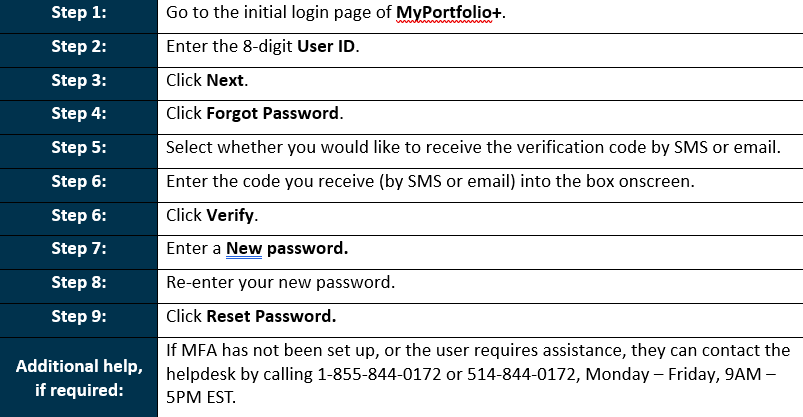
If a user forgets their MyPortfolio+ password after setting up MFA, can they reset the password themselves?
Yes. Once MFA has been successfully set up on an account, forgotten passwords can be self-reset by the user anytime by following the steps below:
Which profile types can use the self-serve password reset feature?
Both individual and non-individual MyPortfolio+ profile types can use the self-serve password reset feature, once MFA is configured.
Need Help?
Trouble setting up MFA or logging in for the first time?
Monday to Friday
9:00 a.m. to 5:00 p.m. ET
Any other questions about MyPortfolio+
Contact you Acumen Advisor, who can help with anything related to your accounts.
*for your security, advisors cannot retrieve verification codes on your behalf.